Pages

Showing posts with label mobile. Show all posts

Tuesday, February 26, 2013

My iPhone and its bugs

Nothing is perfect. Its nature's rule but we can develop thing can be close to perfect.

People say Apple stuff is pretty perfect. Lets take example of iPhone - worlds dominant handset manufacturer and seller. Best in feature, app, look and usage. I see some of basic functionality are buggy here.

1. on iPhone4. iOS 5.
We use SMS messaging service as basic tool and way to communication.
Feature, group SMS.

I added some of my friends in sms "To" list.
Put some text.


If some of the text sms failed to deliver. It shows red estimations sign like !
Problem is we never come to know what all sent successfully and which all are failed.

This is strange bug from iOS 5.0.

2. Recently, I tried to delete some pics from photo stream. iOS don't allow you to delete files from your device. 

You have to connect to PC and backup photoes and resync to delete/modify pics on your device.


3. I also have got iPhone 3GS which sometimes have issue of picking up the call. Screen fails to recognize my touch while swapping and accepting the call.

Monday, December 27, 2010

My first Winter in Paris


I was lucky to spend initial days of winter in Paris. It was beautiful to see (just to see not to go out in cold :P) the snow falls. Once woke up on wonderful morning to have walk around places near by. Its really beautiful to see the Eiffel tower and snowy gardens. 

I was living near Eiffel tower on rue de Federation so I was use to roam around the snowy walkways around the tower. There were very few people around on snowy day. I could see few kid enjoying their school trip. Kids were having fun in such freezing cold. I tool the walk on bridge on river Siene from Eiffel side towards Trocadero. Walked on gardens around Traocadero. Poor statue of nude man was freezing in cold. I reached near place de Kleber. I walked along the Avenue de kleber till Arc de Trumph and turned towards my destination to walk to office.
Those were last few days of my stay in Paris and wanted to enjoy chilling weather and place. 
Its fun to play in snow if you are with friends. Having hot coffee is best thing to do while sitting on outside the hotel. Chilling weather and hot coffee is perfect combination. Wonderful thing is French people hardly wait for snow to stop. It always good to carry on your work irrespective of the weather. Its assumed to be variable. But yes, in early winter days, most of people are not ready to for snowy roads. They have to change car tires to be good to go on snowy roads.

Wednesday, June 23, 2010

Actual Bandwidth


Bandwidth is seen as very relative term in daily usage. Even the small internet cafe owner keeps on saying, too less bandwidth so speed is slow.

I just tried to measure it while i was moving around the place.

Here is screen shot of Gprs speed with Airtel Mobile office APN in Banglore ! 72 kbps is great in roaming.


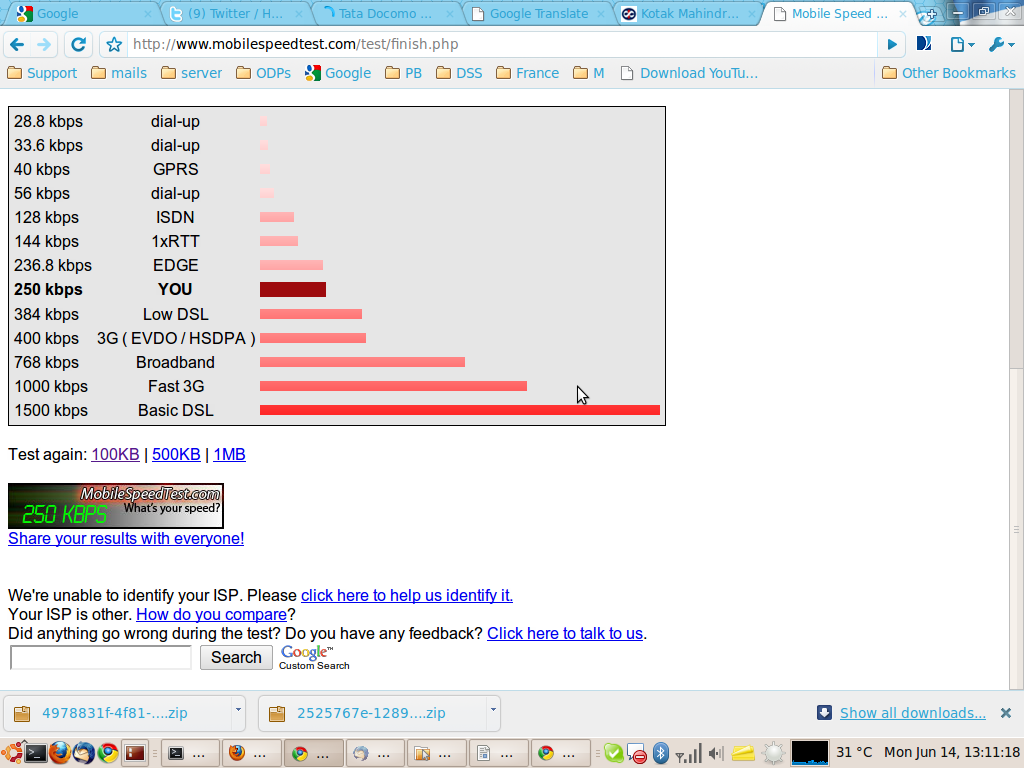
Another speed test on my desktop using Tata Photon+ . I must agree Tata is giving best speed as compared to any other USB data cards. Reliance is poor in this. Even connection problems are very common with Reliance USB data cards.


It was final test run directly using direct LAN ssh tunnel. Speed is good!


Funny thing is, i tested the same again in Mumbai when I was back to home. It was showing me mere 10 to 15 kpbs !!! I know, it could be due to HLR registry OR routing problem .... Most imp, it was raining badly in Mumbai at that time. Airtel is always in trouble with rains & fires. It was totally messed up when once of Airtel MSC was under fire! In fact, many prepaid users were able to make free calls for many days!!! :D

Will keep on posting on new finding.

Sites to check your data speed visit :
http://mobilespeedtest.com/ for mobile phones

Don't compare results of above two links, it'll never be same as 2nd actually does that data transfer while first just checks the available bandwidth.

suggestions, comments welcome

Thursday, February 18, 2010

Updating status on twitter,facebook, gtalk, Buzz using twitter

Updating status on twitter,facebook, gtalk, Buzz using twitter :

With launch in G Buzz, there are many social n/w playground.
Funny thing is, Buzz 3rd party integration just says, ur twits will be shown on buzz.. but it didnt work :( .. buggy google... sad to say but true!

Googles bad habit of launching products in beta n making them bug free with help of users.. are we the gunny pigs to experiment on ??? i forgive G ! just a favour for providing so many free services ;-) never mind G!

I wondering how long it'll take to update my status each time on all of the sites ! its really bad idea to do it manually on all sites..

Here i got way around to do it :
1. How to add to facebook status : Search twitter in search box of Fb. u 'll cool twitter icon.. just get the app for Fb.. u ;ll be prompted with twitter login & check for settings to update your status from twitter. DONE !!

2. For Buzz & Gtalk : Go to free app site http://twitter2gtalk.appspot.com/ ! Many Thanks to http://twitter.com/broderboy for providing such a cool app :
This web service will read ur latest twit on regular basis (currently its checking on half hourly basis ) & updates ur Gtalk status ! The itself is cool enough to say that.
Once gtalk status is updated. Buzz too get gtalk profile text to update. G has done it properly.
http://twitter.com/broderboy is smart enough to not take msg with "@" from twitter status. thats good thing.

U can get thousands of cool mobile & desktop apps to update ur twitter status. This is how I update my status.. twitter is now my most favourite on line digital open diary !!!

in reference to: Facebook (view on Google Sidewiki)

Tuesday, June 30, 2009

Dictionary bot released !

Dear friends,

My pleasure to introduce dictionary service to all with chat bot !

Its available to most of chat profile with below bot id


[EnglishDictionary@bot.im: online] EnglishDictionary@bot.im (Jabber)

[EnglishDictionary: online] EnglishDictionary (Yahoo)

[EnglishDictionary: online] EnglishDictionary (MSN)

[EnglishDictionary: online] EnglishDictionary (AIM)

[EnglishDictiona: online] EnglishDictiona (Twitter)


Enjoy! Its bit slow as perfomance related aspect are yet not considered ;-)

will do it some time later !

Thursday, June 4, 2009

Tuesday, February 10, 2009

micro emulator on FC6 Linux

Micro emulator :

Tried hands on java-j2me emulator on linux machine. Its also helpful in j2me development & trying out small java apps.

To add micro emulator as command in linux, put below lines in a file named microemulator. change permissions to executable. put the file in system path ie /usr/bin or any bin path

Command can set user-agent as "Nokia6030" same can be changed to any phone. Using proxy to connect net. Assuming microemulator is installed at path
/opt/microemulator-2.0.1/
======================================================================
java -Dhttp.agent="Nokia6030/Nokia" -Dhttp.proxyHost= -Dhttp.proxyPort= -Xms32m -Xmx64m -jar /opt/microemulator-2.0.1/microemulator.jar -cp /opt/microemulator-2.0.1/lib/t/microemu-nokia-120.jar $1
======================================================================

You can delete RMS data stored by application by deleting midp suite data path : /home/mahendra/.microemulator/suite-*

For more details :


Home Page
Usage
Demo
Images


Screenshot as mentioned


Screenshot 240X320 device


For further help/assistance ... post query below

Tuesday, February 3, 2009

Ssh on Mobile !

Guys,

Many of mobile phone user wish to access their server through Ssh proto. I got something for you. Only thing you should have is basic midp1.0 supported phone

You can download the app from http://www.xk72.com/midpssh/download.php here . Depending on phone capabilily you should donwload java/midp app.

Only you need is Gprs connectivity to download and connect the server. App has nice functionality like macro, store session, font change.


ps -eaf Screen Shot 2

Here are some screen shots :

Top command o/p on N72 with midp ssh. I even have putty for Symbian client. But I think this is the best ssh client.


TOP Screen Shot 2


Another with dynamic screen. I feel only drawback is connectivity handled by java. S60 Putty work in better manner for connectivity.. Its bit obvious as java has to access native API of Symbian/Proprietor OS of the Phone.

You can download Putty for S60 from here

Download Page S60

If you are facing any connectivity issue.. Let me know. Would like to share some more stuff.. :)

Pls make sure you have unlimited data plan for GPRS access. :) ... Should not get heart attach on seeing mobile bill ;)

Enjoy

Friday, September 12, 2008

Twittering with world!!

We would always love to be in touch with all. Here is the asap way to be updated & to update other about what you are doing?

Yes. I'm talking about "Twitter" with Widset http://www.widsets.com/

I 've been using Widset from last 2 months. It been always in very frequently used programs.

My updates : http://twitter.com/mahenT
Somemore details http://friendfeed.com/mahent

I'm sure you 'll love to be connected & updated with your mobile phone. :)
There 1000 things u can do with your widset. You can create own widset, rss feed reader, whether updates, games, list is huge....

Thursday, June 5, 2008

Stay Connected to the world

These days, it's all about staying connected. Sometimes you're stuck at your desk and you need to ask someone an urgent question. Sometimes you're on unfamiliar turf and you need a guide. This month, we look at an improved instant messenger and a Wi-Fi service that helps you find local businesses from your laptop or mobile. Both are as free as air.

nimbuzz
twitter
ebuddy
meebo
yahoo online chat for mobile


The Loki Toolbar allows you to do location-based search and navigation right from your browser. The Toolbar combines GPS-like location, local search and one-button access to location-based content, making the Internet revolve around you

www.loki.com

Wednesday, May 28, 2008

My Mobile surfing

I Hope this 'll be of great help when you are alone at some lonely place. You can go ahead and get in touch with help of WAP portal which are helping mobile user in great extend. I feel it's more like a Internet of Mobile world, which is growing like anything.


Google http://wap.google.com/
Google http://mobile.google.com/
Gmail - http://www.nodrm.com/gmail
Google Maps http://wap.mgmaps.com/
Yahoo http://us.m.yahoo.com/?tsrc=rawfront
Yahoo - http://wap.yahoo.com
Yahoo Messenger - http://mm.yahoo.com
Rediff - http://mobile.rediff.com
Cellfun http://wap.cellufun.com/
GCalSync http://wap.gcalsync.com/
WAP community http://www.wap.com/
Mobiile Content http://wap.mobile9.com
Mobile Softwares Download wap.getjar.com
Send Email Anonymously - http://webcab.de/sm.wml#WSM
Live Cricket Scores - http://wap.ananova.com/sport
Dictionary - http://dictionary.reference.com/wml/#dict
Free Greeting cards - http://www.wapcardz.com
Hotmail - http://mobile.msn.com
MSN Messenger - http://mob.e-messenger.net
Symbian Softwares - http://wap.my-symbian.com/wap
Pocket Doctor - http://wap.pocketdoctor.co.uk
BBC UK - http://bbc.co.uk/mobile
Browser Spy - http://wap.gemal.dk
BSE India - http://wap.bseindia.com
Check Domain Name - http://wap.checkdomain.com

AOL wap.aol.com/
JIMM wap.jimm.org/
USA Today wap.usatoday.com
Swiss Info wap.swissinfo.org/
MLB wap.mlb.com/
http://www.getjar.com/software/
http://www.mobile9.com/

And list goes on increasing...

Monday, March 10, 2008

Internet on FC6 linux with Airtel GPRS DKU2.0


First, you got to install wvdial if not present on your linux system.( Comes with OS on FC, Redhat and CentOS)

u can try

#yum install wvdial

I used Airtel as GPRS carriers with Nokia N72 phone on Dell D520 Laptop running with FC6 Linux

username & password is taken as service provider. Other setting same as given below

File /etc/wvdial.conf :
[root@ ~]# more /etc/wvdial.conf
[Modem0]
Modem= /dev/ttyACM0
Baud= 115200
SetVolume= 0
DialCommand= ATDT
FlowControl= Hardware(CRTSCTS)
[Dialer gprs]
Username=airtelgprs.com
Password=airtelgprs.com
Phone=*99***1#
Stupid Mode= 1
Inherits= Modem0

[root@mahendra ~]# wvdial gprs
--> WvDial: Internet dialer version 1.54.0
--> Cannot get information for serial port.
--> Initializing modem.
--> Sending: ATZ
ATZ
OK
--> Modem initialized.
--> Sending: ATDT*99***1#
--> Waiting for carrier.
ATDT*99***1#
CONNECT
~[7f]}#@!}!} } }2}#}$@#}!}$}%\}"}&} }*} } g}%~
--> Carrier detected. Starting PPP immediately.
--> Starting pppd at Mon Mar 10 21:28:06 2008
--> pid of pppd: 12348
--> Using interface ppp0
--> pppd: s.com
--> pppd: s.com
--> pppd: s.com
--> pppd: s.com
--> local IP address 117.98.48.238
--> pppd: s.com
--> remote IP address 10.6.6.6
--> pppd: s.com
--> primary DNS address 202.56.230.5
--> pppd: s.com
--> secondary DNS address 202.56.240.5
--> pppd: s.com

:) Now you are connected,


[root@ ~]# more /etc/resolv.conf
#airtel gprs access DNS IPs
nameserver 202.56.230.5
nameserver 202.56.240.5


Now check

##ifconfig


add p-t-p IP as default gateway to system using :

route add default gw <-IP->

Dear you can browse internet from your favorite browser.

Enjoy.