As internet user I value freedom of speech, expression and sharing. India - country where caste is basis of politics and all working things. We have to have such freedom in living. Its very much expressed since Anna Hazare's andolan with India Against Corruption.
Lets see a specific case where we need freedom to accessing what we want on internet and sharing best of the things over internet/mobile! Recently most of Indian ISPs Internet Service Providers came up idea of blocking all torrent sharing sites for access. I tried to open thepiratebay.org and it showed beautiful message,
"This website/URL has been blocked until further notice either pursuant
to Court orders or on the Directions issued by the Department of
Telecommunications"
Well, matter of fact, I doubt if DoT has really understood the meaning of this. While court and why?
What do you mean by, website or URL?
Forget fighting with India courts or government. Its all waste of time and money. Its well known saying in my mother language. "Smart people don't walk on court steps" , sayings are never exactly translated but meaning makes sense.
Lets come to the point, you can choose either of below solutions:
1. http://www.google.co.in/search?hl=en&rlz=1C1SKPL_enFR451FR451&q=u1201+download&oq=u1201+download&aq=f&aqi=&aql=&gs_l=serp.3...7214.8562.0.8884.9.7.0.0.0.0.0.0..0.0...0.0.wDMs_WA8sGw
download this program called u1201 and just double click, it will create proxy server and changes setting in Windows Internet settings --> LAN to 127.0.0.1 and port.
It will also start IE after creation of proxy. You can now browse internet using this external proxy which allows you to access any torrent site.
2. Download and install tor which comes with portable anonymous IP proxy and firfox. https://www.torproject.org/ OR read here more onthis http://en.wikipedia.org/wiki/Tor_(anonymity_network)
3. Use Jtunnel : http://jamiedubs.com/jtunnel This is wonderful site showing Freedom of Speech.
Jtunnel is java based proxy which allows you to go via this java based proxy server for http, ftp, smtp requests. Its some how not clear, if its keeps anonymousness OR tracks data.
Other good point in using this is, it provides compression for data and images. In fact, you can set image compression ratio to 50% or 80%. Its good thing. As java, it runs smoothly as java application on any operating system. Pls don't expect it to work on native mobile operating systems so soon. But sooner or later on Android and iphone. May be on Symbian if it exist till the time! ;)
4. Use online proxy servers to browse sites you want.
I hardly use 4th option. I preferred to use 3rd, 2nd mostly. It depends on what is need. I feel 1st is handy for Windows, while 2nd and 3rd are cool to work on any OS.
Cheers!! And enjoy your freedom of speech, sharing, browsing and enjoying!!!
Showing posts with label Linux. Show all posts
Showing posts with label Linux. Show all posts
Monday, June 11, 2012


Tuesday, September 7, 2010
Richard Stallman at IIT Powai - Founder of GNU
Bio:
Richard Stallman launched the development of the GNU operating system in 1984. GNU is free software: everyone has the freedom to copy it and redistribute it, as well as to make changes either large or small. The GNU/Linux system, basically the GNU operating system with Linux added, is used on tens of millions of computers today. Stallman has received the ACM Grace Hopper Award, a MacArthur Foundation fellowship, the Electronic Frontier Foundation's Pioneer Award, and the the Takeda Award for Social/Economic Betterment, as well as several honorary doctorates.
It was wonderful.
Talk were on, free software stuff. GNU+Linux philosophy.
nice jokes on bush, iBad,supposed owner of your machine when using billy’s MS OS… it was fun
last event of group photography was good.
i ‘m waiting for group pics
i’ve audio footage of event. I’ll convert the audio to be supported by Free codecs .oga .. as Richard asked all of us to do !..
i ‘m waiting for group pics
i’ve audio footage of event. I’ll convert the audio to be supported by Free codecs .oga .. as Richard asked all of us to do !..
I can do it with ffmpeg ! i love it.
Links:
I will share audio links & pics with you soon.
As asked by Richard Stallman, I've created free video codec video to host on internet :
As asked by Richard Stallman, I've created free video codec video to host on internet :
You may not see this video if you are normal MS Win users as they may not have free codec! Its theora ogg video
Friday, August 20, 2010
Why I don't like Microsoft
Recently I had conversation with one of my friend Amit. It explains well why i dont like microsoft. I dont see windows unless I have to play counter strike !
Still I don't hate them.
(12:02:28 IST) Amit: hi
(12:02:33 IST) Mahen: hey
(12:02:37 IST) Amit sali: have you used MS office 2010?
(12:02:42 IST) Mahen: no man
(12:02:46 IST) Mahen: i never use MS :P
(12:02:52 IST) Amit: :)
(12:02:57 IST) Mahen: no MS office. only openoffice :)
(12:03:01 IST) Mahen: what happen?
(12:03:02 IST) Amit: linux pro ... hhhhmm!!
(12:03:23 IST) Mahen: yup
(12:05:14 IST) Amit: MS 2010 has upgraded my outlook profile ... then I unistalled 2010 and reverted to 2007 ... now I cannot have my old system as before .. not able to view my older emails in pst and archieves
(12:05:15 IST) Amit: :(
(12:05:36 IST) Mahen: Oops
(12:05:40 IST) Amit: F**K MS
(12:05:40 IST) Mahen: thats terrific !
(12:05:44 IST) Mahen: ha ha
(12:05:53 IST) Mahen: u r in trouble dude
(12:06:01 IST) Mahen: call sys admin & go home
(12:06:06 IST) Amit: :)
(12:06:46 IST) Amit: I need to again install 2010 to get my old emails
(12:06:56 IST) Mahen: oh yes. probably
(12:07:03 IST) Mahen: copy ur .pst to backup
(12:07:12 IST) Mahen: & then revert back to MS2007
(12:07:20 IST) Mahen: may be it'll work
(12:07:27 IST) Amit: I hope so
(12:07:34 IST) Mahen: best luck :)
(12:07:51 IST) Mahen: MS may deliver another patch or service pack to resolve this issue :D
(12:08:02 IST) Amit: hahaha
(12:02:28 IST) Amit: hi
(12:02:33 IST) Mahen: hey
(12:02:37 IST) Amit sali: have you used MS office 2010?
(12:02:42 IST) Mahen: no man
(12:02:46 IST) Mahen: i never use MS :P
(12:02:52 IST) Amit: :)
(12:02:57 IST) Mahen: no MS office. only openoffice :)
(12:03:01 IST) Mahen: what happen?
(12:03:02 IST) Amit: linux pro ... hhhhmm!!
(12:03:23 IST) Mahen: yup
(12:05:14 IST) Amit: MS 2010 has upgraded my outlook profile ... then I unistalled 2010 and reverted to 2007 ... now I cannot have my old system as before .. not able to view my older emails in pst and archieves
(12:05:15 IST) Amit: :(
(12:05:36 IST) Mahen: Oops
(12:05:40 IST) Amit: F**K MS
(12:05:40 IST) Mahen: thats terrific !
(12:05:44 IST) Mahen: ha ha
(12:05:53 IST) Mahen: u r in trouble dude
(12:06:01 IST) Mahen: call sys admin & go home
(12:06:06 IST) Amit: :)
(12:06:46 IST) Amit: I need to again install 2010 to get my old emails
(12:06:56 IST) Mahen: oh yes. probably
(12:07:03 IST) Mahen: copy ur .pst to backup
(12:07:12 IST) Mahen: & then revert back to MS2007
(12:07:20 IST) Mahen: may be it'll work
(12:07:27 IST) Amit: I hope so
(12:07:34 IST) Mahen: best luck :)
(12:07:51 IST) Mahen: MS may deliver another patch or service pack to resolve this issue :D
(12:08:02 IST) Amit: hahaha
Sunday, June 27, 2010
How Secured is my password
How Secured is my password
Check how secured are your passwords. For me, its great result. I hate using so complex passwords for my laptop. I have done good enough security on my system.
Even if someone knows my mail password, they can't get mails :P
complexity in using the system makes it difficult for normal intruders to hack abnormal systems.
btw my system password in just 123
Finding its IP, username & how to actually login to my system is your job :D
be careful of getting caught.

Wednesday, June 23, 2010
Actual Bandwidth
Bandwidth is seen as very relative term in daily usage. Even the small internet cafe owner keeps on saying, too less bandwidth so speed is slow.
I just tried to measure it while i was moving around the place.
Here is screen shot of Gprs speed with Airtel Mobile office APN in Banglore ! 72 kbps is great in roaming.

Another speed test on my desktop using Tata Photon+ . I must agree Tata is giving best speed as compared to any other USB data cards. Reliance is poor in this. Even connection problems are very common with Reliance USB data cards.
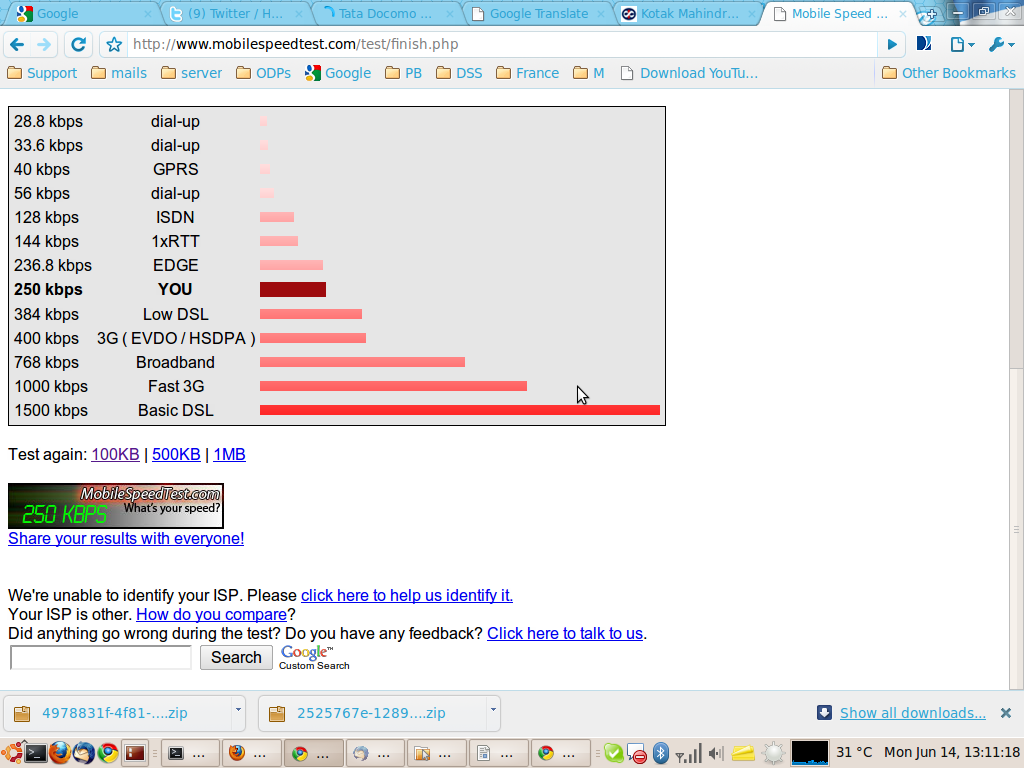
It was final test run directly using direct LAN ssh tunnel. Speed is good!

Funny thing is, i tested the same again in Mumbai when I was back to home. It was showing me mere 10 to 15 kpbs !!! I know, it could be due to HLR registry OR routing problem .... Most imp, it was raining badly in Mumbai at that time. Airtel is always in trouble with rains & fires. It was totally messed up when once of Airtel MSC was under fire! In fact, many prepaid users were able to make free calls for many days!!! :D
Will keep on posting on new finding.
Sites to check your data speed visit :
http://www.speedtest.net/ for desktops
http://mobilespeedtest.com/ for mobile phones
Don't compare results of above two links, it'll never be same as 2nd actually does that data transfer while first just checks the available bandwidth.
suggestions, comments welcome
Tuesday, January 19, 2010
Pdf documet creation & encyption
Just encounted with pdf creation :
One can simply find our Oracle's (earlier Sun's, although i'm not too happy to say non-open oracle) OpenOffice ! U can convert any doc, ppt, xls to pdf file.
Now comes the important part of protecting the document.
Here are some FOSS tools to get it done
[root@mahendra ~]# yum -y install pdftk*
Not loading "blacklist" plugin, as it is disabled
Not loading "whiteout" plugin, as it is disabled
Loaded plugins: refresh-packagekit
Config time: 1.676
Yum Version: 3.2.24
Setting up Package Sacks
pkgsack time: 4.772
rpmdb time: 0.424
Setting up Install Process
Building updates object
up:Obs Init time: 0.272
up:simple updates time: 0.479
up:obs time: 0.016
up:condense time: 0.000
updates time: 36.928
Resolving Dependencies
--> Finished Dependency Resolution
Dependency Process ending
Depsolve time: 161.988
Dependencies Resolved
====================================================================================================
Package Arch Version Repository Size
====================================================================================================
Installing:
pdftk i586 1.41-21.fc11 updates 90 k
Installing for dependencies:
bouncycastle i586 1.44-1.fc11 updates 3.3 M
bouncycastle-mail i586 1.44-1.fc11 updates 502 k
bouncycastle-tsp i586 1.44-1.fc11 updates 107 k
itext i586 2.1.7-5.fc11 updates 3.1 M
Transaction Summary
====================================================================================================
Install 5 Package(s)
Upgrade 0 Package(s)
Total download size: 7.2 M
Downloading Packages:
(1/5): bouncycastle-1.44-1.fc11.i586.rpm | 3.3 MB 00:21
(2/5): bouncycastle-mail-1.44-1.fc11.i586.rpm | 502 kB 00:05
(3/5): bouncycastle-tsp-1.44-1.fc11.i586.rpm | 107 kB 00:01
(4/5): itext-2.1.7-5.fc11.i586.rpm | 3.1 MB 00:23
(5/5): pdftk-1.41-21.fc11.i586.rpm | 90 kB 00:01
----------------------------------------------------------------------------------------------------
Total 125 kB/s | 7.2 MB 00:58
Running rpm_check_debug
Adding Package pdftk-1.41-21.fc11.i586 in mode u
Adding Package bouncycastle-1.44-1.fc11.i586 in mode u
Adding Package bouncycastle-tsp-1.44-1.fc11.i586 in mode u
Adding Package itext-2.1.7-5.fc11.i586 in mode u
Adding Package bouncycastle-mail-1.44-1.fc11.i586 in mode u
rpm_check_debug time: 0.336
Running Transaction Test
Adding Package pdftk-1.41-21.fc11.i586 in mode u
Adding Package bouncycastle-1.44-1.fc11.i586 in mode u
Adding Package bouncycastle-tsp-1.44-1.fc11.i586 in mode u
Adding Package itext-2.1.7-5.fc11.i586 in mode u
Adding Package bouncycastle-mail-1.44-1.fc11.i586 in mode u
Finished Transaction Test
Transaction Test Succeeded
Transaction Test time: 1.141
Adding Package pdftk-1.41-21.fc11.i586 in mode u
Adding Package bouncycastle-1.44-1.fc11.i586 in mode u
Adding Package bouncycastle-tsp-1.44-1.fc11.i586 in mode u
Adding Package itext-2.1.7-5.fc11.i586 in mode u
Adding Package bouncycastle-mail-1.44-1.fc11.i586 in mode u
Running Transaction
Installing : bouncycastle-1.44-1.fc11.i586 1/5
Installing : bouncycastle-mail-1.44-1.fc11.i586 2/5
Installing : bouncycastle-tsp-1.44-1.fc11.i586 3/5
Installing : itext-2.1.7-5.fc11.i586 4/5
Installing : pdftk-1.41-21.fc11.i586 5/5
Transaction time: 15.280
Installed:
pdftk.i586 0:1.41-21.fc11
Dependency Installed:
bouncycastle.i586 0:1.44-1.fc11 bouncycastle-mail.i586 0:1.44-1.fc11
bouncycastle-tsp.i586 0:1.44-1.fc11 itext.i586 0:2.1.7-5.fc11
Complete!
[root@mahendra ~]#
--> Finished Dependency Resolution
Dependency Process ending
Depsolve time: 161.988
Dependencies Resolved
====================================================================================================
Package Arch Version Repository Size
====================================================================================================
Installing:
pdftk i586 1.41-21.fc11 updates 90 k
Installing for dependencies:
bouncycastle i586 1.44-1.fc11 updates 3.3 M
bouncycastle-mail i586 1.44-1.fc11 updates 502 k
bouncycastle-tsp i586 1.44-1.fc11 updates 107 k
itext i586 2.1.7-5.fc11 updates 3.1 M
Transaction Summary
====================================================================================================
Install 5 Package(s)
Upgrade 0 Package(s)
Total download size: 7.2 M
Downloading Packages:
(1/5): bouncycastle-1.44-1.fc11.i586.rpm | 3.3 MB 00:21
(2/5): bouncycastle-mail-1.44-1.fc11.i586.rpm | 502 kB 00:05
(3/5): bouncycastle-tsp-1.44-1.fc11.i586.rpm | 107 kB 00:01
(4/5): itext-2.1.7-5.fc11.i586.rpm | 3.1 MB 00:23
(5/5): pdftk-1.41-21.fc11.i586.rpm | 90 kB 00:01
----------------------------------------------------------------------------------------------------
Total 125 kB/s | 7.2 MB 00:58
Running rpm_check_debug
Adding Package pdftk-1.41-21.fc11.i586 in mode u
Adding Package bouncycastle-1.44-1.fc11.i586 in mode u
Adding Package bouncycastle-tsp-1.44-1.fc11.i586 in mode u
Adding Package itext-2.1.7-5.fc11.i586 in mode u
Adding Package bouncycastle-mail-1.44-1.fc11.i586 in mode u
rpm_check_debug time: 0.336
Running Transaction Test
Adding Package pdftk-1.41-21.fc11.i586 in mode u
Adding Package bouncycastle-1.44-1.fc11.i586 in mode u
Adding Package bouncycastle-tsp-1.44-1.fc11.i586 in mode u
Adding Package itext-2.1.7-5.fc11.i586 in mode u
Adding Package bouncycastle-mail-1.44-1.fc11.i586 in mode u
Finished Transaction Test
Transaction Test Succeeded
Transaction Test time: 1.141
Adding Package pdftk-1.41-21.fc11.i586 in mode u
Adding Package bouncycastle-1.44-1.fc11.i586 in mode u
Adding Package bouncycastle-tsp-1.44-1.fc11.i586 in mode u
Adding Package itext-2.1.7-5.fc11.i586 in mode u
Adding Package bouncycastle-mail-1.44-1.fc11.i586 in mode u
Running Transaction
Installing : bouncycastle-1.44-1.fc11.i586 1/5
Installing : bouncycastle-mail-1.44-1.fc11.i586 2/5
Installing : bouncycastle-tsp-1.44-1.fc11.i586 3/5
Installing : itext-2.1.7-5.fc11.i586 4/5
Installing : pdftk-1.41-21.fc11.i586 5/5
Transaction time: 15.280
Installed:
pdftk.i586 0:1.41-21.fc11
Dependency Installed:
bouncycastle.i586 0:1.44-1.fc11 bouncycastle-mail.i586 0:1.44-1.fc11
bouncycastle-tsp.i586 0:1.44-1.fc11 itext.i586 0:2.1.7-5.fc11
Complete!
[root@mahendra ~]#
Examples :
pdftk my.pdf output mydoc128.pdf owner_pw foopass user_pw passwd
Reference :
http://angusj.com/pdftkb/
http://www.accesspdf.com/pdftk/
NOTE: Use pdf OR ps before thinking twice to print the doc & sending on snail mail..
save nature.. save humans
One can simply find our Oracle's (earlier Sun's, although i'm not too happy to say non-open oracle) OpenOffice ! U can convert any doc, ppt, xls to pdf file.
Now comes the important part of protecting the document.
Here are some FOSS tools to get it done
[root@mahendra ~]# yum -y install pdftk*
Not loading "blacklist" plugin, as it is disabled
Not loading "whiteout" plugin, as it is disabled
Loaded plugins: refresh-packagekit
Config time: 1.676
Yum Version: 3.2.24
Setting up Package Sacks
pkgsack time: 4.772
rpmdb time: 0.424
Setting up Install Process
Building updates object
up:Obs Init time: 0.272
up:simple updates time: 0.479
up:obs time: 0.016
up:condense time: 0.000
updates time: 36.928
Resolving Dependencies
--> Finished Dependency Resolution
Dependency Process ending
Depsolve time: 161.988
Dependencies Resolved
====================================================================================================
Package Arch Version Repository Size
====================================================================================================
Installing:
pdftk i586 1.41-21.fc11 updates 90 k
Installing for dependencies:
bouncycastle i586 1.44-1.fc11 updates 3.3 M
bouncycastle-mail i586 1.44-1.fc11 updates 502 k
bouncycastle-tsp i586 1.44-1.fc11 updates 107 k
itext i586 2.1.7-5.fc11 updates 3.1 M
Transaction Summary
====================================================================================================
Install 5 Package(s)
Upgrade 0 Package(s)
Total download size: 7.2 M
Downloading Packages:
(1/5): bouncycastle-1.44-1.fc11.i586.rpm | 3.3 MB 00:21
(2/5): bouncycastle-mail-1.44-1.fc11.i586.rpm | 502 kB 00:05
(3/5): bouncycastle-tsp-1.44-1.fc11.i586.rpm | 107 kB 00:01
(4/5): itext-2.1.7-5.fc11.i586.rpm | 3.1 MB 00:23
(5/5): pdftk-1.41-21.fc11.i586.rpm | 90 kB 00:01
----------------------------------------------------------------------------------------------------
Total 125 kB/s | 7.2 MB 00:58
Running rpm_check_debug
Adding Package pdftk-1.41-21.fc11.i586 in mode u
Adding Package bouncycastle-1.44-1.fc11.i586 in mode u
Adding Package bouncycastle-tsp-1.44-1.fc11.i586 in mode u
Adding Package itext-2.1.7-5.fc11.i586 in mode u
Adding Package bouncycastle-mail-1.44-1.fc11.i586 in mode u
rpm_check_debug time: 0.336
Running Transaction Test
Adding Package pdftk-1.41-21.fc11.i586 in mode u
Adding Package bouncycastle-1.44-1.fc11.i586 in mode u
Adding Package bouncycastle-tsp-1.44-1.fc11.i586 in mode u
Adding Package itext-2.1.7-5.fc11.i586 in mode u
Adding Package bouncycastle-mail-1.44-1.fc11.i586 in mode u
Finished Transaction Test
Transaction Test Succeeded
Transaction Test time: 1.141
Adding Package pdftk-1.41-21.fc11.i586 in mode u
Adding Package bouncycastle-1.44-1.fc11.i586 in mode u
Adding Package bouncycastle-tsp-1.44-1.fc11.i586 in mode u
Adding Package itext-2.1.7-5.fc11.i586 in mode u
Adding Package bouncycastle-mail-1.44-1.fc11.i586 in mode u
Running Transaction
Installing : bouncycastle-1.44-1.fc11.i586 1/5
Installing : bouncycastle-mail-1.44-1.fc11.i586 2/5
Installing : bouncycastle-tsp-1.44-1.fc11.i586 3/5
Installing : itext-2.1.7-5.fc11.i586 4/5
Installing : pdftk-1.41-21.fc11.i586 5/5
Transaction time: 15.280
Installed:
pdftk.i586 0:1.41-21.fc11
Dependency Installed:
bouncycastle.i586 0:1.44-1.fc11 bouncycastle-mail.i586 0:1.44-1.fc11
bouncycastle-tsp.i586 0:1.44-1.fc11 itext.i586 0:2.1.7-5.fc11
Complete!
[root@mahendra ~]#
--> Finished Dependency Resolution
Dependency Process ending
Depsolve time: 161.988
Dependencies Resolved
====================================================================================================
Package Arch Version Repository Size
====================================================================================================
Installing:
pdftk i586 1.41-21.fc11 updates 90 k
Installing for dependencies:
bouncycastle i586 1.44-1.fc11 updates 3.3 M
bouncycastle-mail i586 1.44-1.fc11 updates 502 k
bouncycastle-tsp i586 1.44-1.fc11 updates 107 k
itext i586 2.1.7-5.fc11 updates 3.1 M
Transaction Summary
====================================================================================================
Install 5 Package(s)
Upgrade 0 Package(s)
Total download size: 7.2 M
Downloading Packages:
(1/5): bouncycastle-1.44-1.fc11.i586.rpm | 3.3 MB 00:21
(2/5): bouncycastle-mail-1.44-1.fc11.i586.rpm | 502 kB 00:05
(3/5): bouncycastle-tsp-1.44-1.fc11.i586.rpm | 107 kB 00:01
(4/5): itext-2.1.7-5.fc11.i586.rpm | 3.1 MB 00:23
(5/5): pdftk-1.41-21.fc11.i586.rpm | 90 kB 00:01
----------------------------------------------------------------------------------------------------
Total 125 kB/s | 7.2 MB 00:58
Running rpm_check_debug
Adding Package pdftk-1.41-21.fc11.i586 in mode u
Adding Package bouncycastle-1.44-1.fc11.i586 in mode u
Adding Package bouncycastle-tsp-1.44-1.fc11.i586 in mode u
Adding Package itext-2.1.7-5.fc11.i586 in mode u
Adding Package bouncycastle-mail-1.44-1.fc11.i586 in mode u
rpm_check_debug time: 0.336
Running Transaction Test
Adding Package pdftk-1.41-21.fc11.i586 in mode u
Adding Package bouncycastle-1.44-1.fc11.i586 in mode u
Adding Package bouncycastle-tsp-1.44-1.fc11.i586 in mode u
Adding Package itext-2.1.7-5.fc11.i586 in mode u
Adding Package bouncycastle-mail-1.44-1.fc11.i586 in mode u
Finished Transaction Test
Transaction Test Succeeded
Transaction Test time: 1.141
Adding Package pdftk-1.41-21.fc11.i586 in mode u
Adding Package bouncycastle-1.44-1.fc11.i586 in mode u
Adding Package bouncycastle-tsp-1.44-1.fc11.i586 in mode u
Adding Package itext-2.1.7-5.fc11.i586 in mode u
Adding Package bouncycastle-mail-1.44-1.fc11.i586 in mode u
Running Transaction
Installing : bouncycastle-1.44-1.fc11.i586 1/5
Installing : bouncycastle-mail-1.44-1.fc11.i586 2/5
Installing : bouncycastle-tsp-1.44-1.fc11.i586 3/5
Installing : itext-2.1.7-5.fc11.i586 4/5
Installing : pdftk-1.41-21.fc11.i586 5/5
Transaction time: 15.280
Installed:
pdftk.i586 0:1.41-21.fc11
Dependency Installed:
bouncycastle.i586 0:1.44-1.fc11 bouncycastle-mail.i586 0:1.44-1.fc11
bouncycastle-tsp.i586 0:1.44-1.fc11 itext.i586 0:2.1.7-5.fc11
Complete!
[root@mahendra ~]#
Examples :
Merge Two or More PDFs into a New Document
pdftk 1.pdf 2.pdf 3.pdf cat output 123.pdf
or (Using Handles):
pdftk A=1.pdf B=2.pdf cat A B output 12.pdf
or (Using Wildcards):
pdftk *.pdf cat output combined.pdf
Split Select Pages from Multiple PDFs into a New Document
pdftk A=one.pdf B=two.pdf cat A1-7 B1-5 A8 output combined.pdf
Rotate the First Page of a PDF to 90 Degrees Clockwise
pdftk in.pdf cat 1E 2-end output out.pdf
Rotate an Entire PDF Document's Pages to 180 Degrees
pdftk in.pdf cat 1-endS output out.pdf
Encrypt a PDF using 128-Bit Strength (the Default) and Withhold All Permissions (the Default)
pdftk mydoc.pdf output mydoc.128.pdf owner_pw foopass
Same as Above, Except a Password is Required to Open the PDF
pdftk mydoc.pdf output mydoc.128.pdf owner_pw foo user_pw baz
Same as Above, Except Printing is Allowed (after the PDF is Open)
pdftk mydoc.pdf output mydoc.128.pdf owner_pw foo user_pw baz allow printing
Decrypt a PDF
pdftk secured.pdf input_pw foopass output unsecured.pdf
Join Two Files, One of Which is Encrypted (the Output is Not Encrypted)
pdftk A=secured.pdf mydoc.pdf input_pw A=foopass cat output combined.pdf
Uncompress PDF Page Streams for Editing the PDF Code in a Text Editor
pdftk mydoc.pdf output mydoc.clear.pdf uncompress
Repair a PDF's Corrupted XREF Table and Stream Lengths (If Possible)
pdftk broken.pdf output fixed.pdf
Burst a Single PDF Document into Single Pages and Report its Data to doc_data.txt
pdftk mydoc.pdf burst
Report on PDF Document Metadata, Bookmarks and Page Labels
pdftk mydoc.pdf dump_data output report.txt
Most imp command to set read passwd for pdf :pdftk my.pdf output mydoc128.pdf owner_pw foopass user_pw passwd
Reference :
http://angusj.com/pdftkb/
http://www.accesspdf.com/pdftk/
NOTE: Use pdf OR ps before thinking twice to print the doc & sending on snail mail..
save nature.. save humans
Friday, June 26, 2009
Creating a bot!
How to create a simple bot to your service :
Service something like dictionary or movie search is cool on automatic bot. The basic service should be available on line anytime to serve your request. I searched a lot to find good, useful bots around the globe. Here are some which are really interesting to use on daily basis :
webtoim@gmail.com
jobs@chat.naukari.com
I've added above bots on my gtalk !
another one I just tried with http://www.imified.com/ is mahendra@bot.im :
You just need to create your own free account on imified.com and host a php, jsp logic URL on some hosting site.
Its pretty easy to create your own bot to do basic operations.
Thursday, June 18, 2009
Are you a page addict ?
Something being hobby or use to is kind of okey but "Addiction" is bad !!
Now a days people gets addicted to cellphone, PC, TV . Earlier trend was old with cigar, drinks, gambling, etc
I came across addition of browsing over similar set of page again and again on net. Something like, just visiting google.com even u don't have any thing in mind to be searched. Too frequently checking mails are kind of such additions.
Today's blog is too control Web page addition. Use a simple browser like Firefox. Pretty secured and equipped with billions of plug ins try various things. Get a plugin called http://pageaddict.com/ , available to download in xpi format at http://pageaddict.com/download.html
It supported on Firefox 3.0 & 2.0 so no worry. U just need to install and config it. U can find plugin link in Tools-->Pageaddict
Click on it, it'll take u too its site. U can do required setting on site itself. Its very simple !!
Here are some screen shot to make it more comfortable.
History of visited time along with tags/groups.
Its stores all history from day1 to yesterday.

Another screen shot showing daily config and site browsed.

Friday, February 13, 2009
VirtualBox by Sun
VirtuaBox :
Sun took over Innotek VBox. Master class product to use multiple OSs on Linux box. I have became huge fan when I tried it. Most imp thing is no sign up, trial version OR registration headache.. Goes very well as open source.
As Linux user, I had limitation while using Microsoft supported stuff. As company intranet & many websites are still IE crazy. I installed Xp with Vbox on my Linux FC6.
Product site Download Page
ScreenShot
Win Xp on Linux Box :

Its was of great use when I started playing Counter Strike. I can start Vbox & play CS. Only you need to care is space & physical memory allocated should be good enough to do your stuff on VBox.
If you go for multiple OS on Vbox.. Physical memory allowed to allocate reduces as underlined OS need to have enough memory..
Guys you can enjoy all your games, movie, other utils of Win environment which may not work in Linux with WINE. Most of n/w stuff don't work with WINE.
Enjoy !
Keep posted if any issue.

Sun took over Innotek VBox. Master class product to use multiple OSs on Linux box. I have became huge fan when I tried it. Most imp thing is no sign up, trial version OR registration headache.. Goes very well as open source.
As Linux user, I had limitation while using Microsoft supported stuff. As company intranet & many websites are still IE crazy. I installed Xp with Vbox on my Linux FC6.
Product site Download Page
ScreenShot
Win Xp on Linux Box :

Its was of great use when I started playing Counter Strike. I can start Vbox & play CS. Only you need to care is space & physical memory allocated should be good enough to do your stuff on VBox.
If you go for multiple OS on Vbox.. Physical memory allowed to allocate reduces as underlined OS need to have enough memory..
Guys you can enjoy all your games, movie, other utils of Win environment which may not work in Linux with WINE. Most of n/w stuff don't work with WINE.
Enjoy !
Keep posted if any issue.
Tuesday, February 10, 2009
micro emulator on FC6 Linux
Micro emulator :
Tried hands on java-j2me emulator on linux machine. Its also helpful in j2me development & trying out small java apps.
To add micro emulator as command in linux, put below lines in a file named microemulator. change permissions to executable. put the file in system path ie /usr/bin or any bin path
Command can set user-agent as "Nokia6030" same can be changed to any phone. Using proxy to connect net. Assuming microemulator is installed at path /opt/microemulator-2.0.1/
======================================================================
java -Dhttp.agent="Nokia6030/Nokia" -Dhttp.proxyHost= -Dhttp.proxyPort= -Xms32m -Xmx64m -jar /opt/microemulator -2.0.1/microemulator.jar -cp /opt/microemulator-2.0.1/lib/t/microemu-nokia-120.jar $1
======================================================================
You can delete RMS data stored by application by deleting midp suite data path : /home/mahendra/.microemulator/suite-*
For more details :
Home Page
Usage
Demo
Images
 Screenshot as mentioned
 Screenshot 240X320 device
For further help/assistance ... post query below
Tried hands on java-j2me emulator on linux machine. Its also helpful in j2me development & trying out small java apps.
To add micro emulator as command in linux, put below lines in a file named microemulator. change permissions to executable. put the file in system path ie /usr/bin or any bin path
Command can set user-agent as "Nokia6030" same can be changed to any phone. Using proxy to connect net. Assuming microemulator is installed at path /opt/microemulator-2.0.1/
======================================================================
java -Dhttp.agent="Nokia6030/Nokia" -Dhttp.proxyHost=
======================================================================
You can delete RMS data stored by application by deleting midp suite data path : /home/mahendra/.microemulator/suite-*
For more details :
Home Page
Usage
Demo
Images
 Screenshot as mentioned
 Screenshot 240X320 device
For further help/assistance ... post query below
Thursday, February 5, 2009
kudzu FC8 Eth1 Linux
Another post on linux after long time.
My friend Chinmay had issue with RealTek NIC on FC8. This guy had already destroyed 2 NIC on same machine. After opening the box, he placed the NIC on 2nd Ethernet slot on mother board. Rebooting machine didn't showed the eth1.
Followed the below steps to add the device :
1. First command to run after new h/w addition in any linux box : kudzu
2. kudzu detected the Ethernet card and added it in but couldn't show it when seen with ifconfig as eth1 config file was not on place.
3. I checked MAC of card with ifconfig -a , device was with name tmp_sakjdh132 ..
4. Created copy of eth0 /etc/sysconfig/network-scripts/ifcnf-eth0.conf to /etc/sysconfig/network-scripts/ifcnf-eth1.conf
5. Changes MAC in /etc/sysconfig/network-scripts/ifcnf-eth1.conf .
6. /etc/init.d/network restart solved all issue.
ifconfig showed eth1 with valid IP
Thats all !
Chinmay was than back to work. Trying to damage 3rd NIC card on his machine ;)
My friend Chinmay had issue with RealTek NIC on FC8. This guy had already destroyed 2 NIC on same machine. After opening the box, he placed the NIC on 2nd Ethernet slot on mother board. Rebooting machine didn't showed the eth1.
Followed the below steps to add the device :
1. First command to run after new h/w addition in any linux box : kudzu
2. kudzu detected the Ethernet card and added it in but couldn't show it when seen with ifconfig as eth1 config file was not on place.
3. I checked MAC of card with ifconfig -a , device was with name tmp_sakjdh132 ..
4. Created copy of eth0 /etc/sysconfig/network-scripts/ifcnf-eth0.conf to /etc/sysconfig/network-scripts/ifcnf-eth1.conf
5. Changes MAC in /etc/sysconfig/network-scripts/ifcnf-eth1.conf .
6. /etc/init.d/network restart solved all issue.
ifconfig showed eth1 with valid IP
Thats all !
Chinmay was than back to work. Trying to damage 3rd NIC card on his machine ;)
Wednesday, January 28, 2009
Ssh stable reverse tunnel
Many servers are being accessed using tunnels and we are tired of recreating the tunnel again & again. Here is script which can sure the availability of tunnel.
The solution to use ssh command without using the console(tty) is to add -t -t option. Option can be used for remote/local tunnels also.
Eg : ssh -t -t -R 2222:localhost:22 username@
This will create a pseudo terminal which will login to remote server. So, actual terminal is not engaged by ssh proc, which makes the tunnel more stable & consistent. To add on further check, we can check if ssh proc is running & create new ssh tunnel using shell script with a cron job at hourly interval. Shell script can be changed to reset tunnel every hour using kill $PID & recreate tunnel to insure availability.
For further details check man pages. Such tunnels can be configured to allow remote login to office machine. Feel free to ask if have any query. Sample tunnel script attached with mail.
Further suggestion are welcome !
The solution to use ssh command without using the console(tty) is to add -t -t option. Option can be used for remote/local tunnels also.
Eg : ssh -t -t -R 2222:localhost:22 username@
This will create a pseudo terminal which will login to remote server. So, actual terminal is not engaged by ssh proc, which makes the tunnel more stable & consistent. To add on further check, we can check if ssh proc is running & create new ssh tunnel using shell script with a cron job at hourly interval. Shell script can be changed to reset tunnel every hour using kill $PID & recreate tunnel to insure availability.
For further details check man pages. Such tunnels can be configured to allow remote login to office machine. Feel free to ask if have any query. Sample tunnel script attached with mail.
Further suggestion are welcome !
Tuesday, November 11, 2008
Accessing same email account & mails from windows & Linux
This blog is in extension to the earlier blog http://mahendratipale.blogspot.com/2008/09/thunderbird-mail-backupmovingshifting.html mentioning backup & moving of mails on linux machine.
If you a dual boot & want to see same mails on both OS. Here is the solution !
Being power user of Linux & windows, I need mails & all other services to work smoothly on both most popular environments. Ater exploring in thunderbird capabilities, I figured out the way to access my company mail account in Linux & Windows using Thunderbird.
C:\Documents and Settings\Administrator\Application Data\Thunderbird\Profiles\jzk0qj4u.default\Mail\Local Folders
Config your mail account in windows.
Boot :
Reboot your system to linux.
Install Thunderbird :
Install thunderbird. Version 1.5+ is good enough.
Mount C:\
Now mount the C:\ drive on linux using mount command.
Same can be done to mount auto on every boot :
Edit /etc/fstab & add similar line as below
/dev/sda2 /home/mahendra/D_drive vfat gid=501,uid=501 1 1
/dev/sda1 /mnt/c ntfs defaults 0 0
pls check your device name /dev/sda_ , its file system & mount directory.
Now open thunderbird, config data directory path to : C:\Documents and Settings\Administrator\Application Data\Thunderbird\Profiles\jzk0qj4u.default\Mail\Local Folders
Restart your thunderbird. I have been using this from last few days. It works smooth. Pls make sure you mount c:\ before opening thunderbird. Otherwise you'll see blanck thunderbird account as mail directory is not accessible.
Comments & Suggestions welcome !!!! :)
If you a dual boot & want to see same mails on both OS. Here is the solution !
Being power user of Linux & windows, I need mails & all other services to work smoothly on both most popular environments. Ater exploring in thunderbird capabilities, I figured out the way to access my company mail account in Linux & Windows using Thunderbird.
C:\Documents and Settings\Administrator\Application Data\Thunderbird\Profiles\jzk0qj4u.default\Mail\Local Folders
Config your mail account in windows.
Boot :
Reboot your system to linux.
Install Thunderbird :
Install thunderbird. Version 1.5+ is good enough.
Mount C:\
Now mount the C:\ drive on linux using mount command.
Same can be done to mount auto on every boot :
Edit /etc/fstab & add similar line as below
/dev/sda2 /home/mahendra/D_drive vfat gid=501,uid=501 1 1
/dev/sda1 /mnt/c ntfs defaults 0 0
pls check your device name /dev/sda_ , its file system & mount directory.
Now open thunderbird, config data directory path to : C:\Documents and Settings\Administrator\Application Data\Thunderbird\Profiles\jzk0qj4u.default\Mail\Local Folders
Restart your thunderbird. I have been using this from last few days. It works smooth. Pls make sure you mount c:\ before opening thunderbird. Otherwise you'll see blanck thunderbird account as mail directory is not accessible.
Comments & Suggestions welcome !!!! :)
Tuesday, September 23, 2008
Formating a undetectable flash drive
Here some more recent RnD done on one of flash drive of friend - Rishit. He was about to dump harddisk data to professional data recoverer.. Eventually settled down on party ;-)
A Transiant flash drive of 120GB space, which was undetectable on WindowsXp.
Condition :
===========================================
[root@localhost ~]# df
Filesystem 1K-blocks Used Available Use% Mounted on
/dev/mapper/VolGroup00-LogVol00
23520588 20259704 2046832 91% /
/dev/sda3 101105 16544 79340 18% /boot
tmpfs 512748 0 512748 0% /dev/shm
/dev/sda2 30701264 25927728 4773536 85% /home/mahendra/D_drive
/dev/sda1 20972824 15270744 5702080 73% /mnt/c
/dev/sdb1 117218240 3006620 114211620 3% /media/Rishit Shah
[root@localhost ~]# mkfs /dev/sdb1
mke2fs 1.39 (29-May-2006)
/dev/sdb1 is mounted; will not make a filesystem here!
[root@localhost ~]# mkfs -t vfat /dev/sdb1
mkfs.vfat 2.11 (12 Mar 2005)
mkfs.vfat: /dev/sdb1 contains a mounted file system.
[root@localhost ~]# mkfs -t vfat /dev/sdb1
mkfs.vfat 2.11 (12 Mar 2005)
mkfs.vfat: /dev/sdb1 contains a mounted file system.
[root@localhost ~]# mkfs /dev/sdb1
mke2fs 1.39 (29-May-2006)
/dev/sdb1 is mounted; will not make a filesystem here!
===========================================
[root@localhost ~]# fdisk -l
Disk /dev/sda: 80.0 GB, 80026361856 bytes
255 heads, 63 sectors/track, 9729 cylinders
Units = cylinders of 16065 * 512 = 8225280 bytes
Device Boot Start End Blocks Id System
/dev/sda1 * 1 2611 20972826 7 HPFS/NTFS
/dev/sda2 2612 6435 30716280 c W95 FAT32 (LBA)
/dev/sda3 6436 6448 104422+ 83 Linux
/dev/sda4 6449 9729 26354632+ 5 Extended
/dev/sda5 6449 9729 26354601 8e Linux LVM
Disk /dev/sdb: 120.0 GB, 120034123776 bytes
255 heads, 63 sectors/track, 14593 cylinders
Units = cylinders of 16065 * 512 = 8225280 bytes
Device Boot Start End Blocks Id System
/dev/sdb1 1 14593 117218241 7 HPFS/NTFS
[root@localhost ~]# fdisk /dev/sd
sda sda1 sda2 sda3 sda4 sda5 sdb sdb1
[root@localhost ~]# fdisk /dev/sdb1
The number of cylinders for this disk is set to 14592.
There is nothing wrong with that, but this is larger than 1024,
and could in certain setups cause problems with:
1) software that runs at boot time (e.g., old versions of LILO)
2) booting and partitioning software from other OSs
(e.g., DOS FDISK, OS/2 FDISK)
Command (m for help): p
Disk /dev/sdb1: 120.0 GB, 120031478784 bytes
255 heads, 63 sectors/track, 14592 cylinders
Units = cylinders of 16065 * 512 = 8225280 bytes
This doesn't look like a partition table
Probably you selected the wrong device.
Device Boot Start End Blocks Id System
/dev/sdb1p1 ? 13578 119522 850995205 72 Unknown
Partition 1 does not end on cylinder boundary.
/dev/sdb1p2 ? 45382 79243 271987362 74 Unknown
Partition 2 does not end on cylinder boundary.
/dev/sdb1p3 ? 10499 10499 0 65 Novell Netware 386
Partition 3 does not end on cylinder boundary.
/dev/sdb1p4 167628 167631 25817+ 0 Empty
Partition 4 does not end on cylinder boundary.
Partition table entries are not in disk order
Command (m for help): d
Partition number (1-4): 1
Command (m for help): d
Partition number (1-4): 2
Command (m for help): d
Partition number (1-4): 3
Command (m for help): d
Selected partition 4
Command (m for help): w
The partition table has been altered!
Calling ioctl() to re-read partition table.
WARNING: Re-reading the partition table failed with error 22: Invalid argument.
The kernel still uses the old table.
The new table will be used at the next reboot.
Syncing disks.
===========================================
Tried deleting all partitions but w command in fdisk dosnt work. Its bad man.
[root@localhost ~]# mkfs.vfat -F 16 /dev/sdb1
mkfs.vfat 2.11 (12 Mar 2005)
mkfs.vfat: /dev/sdb1 contains a mounted file system.
Final try for umounting & then formating the drive
umount -f /dev/sdc1
[root@localhost ~]# mkdosfs -F32 -I /dev/sdc1
mkdosfs 2.11 (12 Mar 2005)
[root@localhost ~]#
Wow !!! I removed the drive & reconnected
[root@localhost ~]# df -h
Filesystem Size Used Avail Use% Mounted on
/dev/mapper/VolGroup00-LogVol00
23G 20G 2.0G 91% /
/dev/sda2 30G 25G 4.6G 85% /home/mahendra/D_drive
/dev/sda3 99M 17M 78M 18% /boot
tmpfs 501M 0 501M 0% /dev/shm
/dev/sda1 21G 15G 5.5G 73% /mnt/c
/dev/sdc1 112G 16K 112G 1% /media/disk-1
It works !
A Transiant flash drive of 120GB space, which was undetectable on WindowsXp.
Condition :
- Drive undetected on Windows
- Mounted on Linux-FC6, but could not delete dirty partition sectors
- Nor move corrupted data to other location.
- Drive was almost in condition to dump
===========================================
[root@localhost ~]# df
Filesystem 1K-blocks Used Available Use% Mounted on
/dev/mapper/VolGroup00-LogVol00
23520588 20259704 2046832 91% /
/dev/sda3 101105 16544 79340 18% /boot
tmpfs 512748 0 512748 0% /dev/shm
/dev/sda2 30701264 25927728 4773536 85% /home/mahendra/D_drive
/dev/sda1 20972824 15270744 5702080 73% /mnt/c
/dev/sdb1 117218240 3006620 114211620 3% /media/Rishit Shah
[root@localhost ~]# mkfs /dev/sdb1
mke2fs 1.39 (29-May-2006)
/dev/sdb1 is mounted; will not make a filesystem here!
[root@localhost ~]# mkfs -t vfat /dev/sdb1
mkfs.vfat 2.11 (12 Mar 2005)
mkfs.vfat: /dev/sdb1 contains a mounted file system.
[root@localhost ~]# mkfs -t vfat /dev/sdb1
mkfs.vfat 2.11 (12 Mar 2005)
mkfs.vfat: /dev/sdb1 contains a mounted file system.
[root@localhost ~]# mkfs /dev/sdb1
mke2fs 1.39 (29-May-2006)
/dev/sdb1 is mounted; will not make a filesystem here!
===========================================
[root@localhost ~]# fdisk -l
Disk /dev/sda: 80.0 GB, 80026361856 bytes
255 heads, 63 sectors/track, 9729 cylinders
Units = cylinders of 16065 * 512 = 8225280 bytes
Device Boot Start End Blocks Id System
/dev/sda1 * 1 2611 20972826 7 HPFS/NTFS
/dev/sda2 2612 6435 30716280 c W95 FAT32 (LBA)
/dev/sda3 6436 6448 104422+ 83 Linux
/dev/sda4 6449 9729 26354632+ 5 Extended
/dev/sda5 6449 9729 26354601 8e Linux LVM
Disk /dev/sdb: 120.0 GB, 120034123776 bytes
255 heads, 63 sectors/track, 14593 cylinders
Units = cylinders of 16065 * 512 = 8225280 bytes
Device Boot Start End Blocks Id System
/dev/sdb1 1 14593 117218241 7 HPFS/NTFS
[root@localhost ~]# fdisk /dev/sd
sda sda1 sda2 sda3 sda4 sda5 sdb sdb1
[root@localhost ~]# fdisk /dev/sdb1
The number of cylinders for this disk is set to 14592.
There is nothing wrong with that, but this is larger than 1024,
and could in certain setups cause problems with:
1) software that runs at boot time (e.g., old versions of LILO)
2) booting and partitioning software from other OSs
(e.g., DOS FDISK, OS/2 FDISK)
Command (m for help): p
Disk /dev/sdb1: 120.0 GB, 120031478784 bytes
255 heads, 63 sectors/track, 14592 cylinders
Units = cylinders of 16065 * 512 = 8225280 bytes
This doesn't look like a partition table
Probably you selected the wrong device.
Device Boot Start End Blocks Id System
/dev/sdb1p1 ? 13578 119522 850995205 72 Unknown
Partition 1 does not end on cylinder boundary.
/dev/sdb1p2 ? 45382 79243 271987362 74 Unknown
Partition 2 does not end on cylinder boundary.
/dev/sdb1p3 ? 10499 10499 0 65 Novell Netware 386
Partition 3 does not end on cylinder boundary.
/dev/sdb1p4 167628 167631 25817+ 0 Empty
Partition 4 does not end on cylinder boundary.
Partition table entries are not in disk order
Command (m for help): d
Partition number (1-4): 1
Command (m for help): d
Partition number (1-4): 2
Command (m for help): d
Partition number (1-4): 3
Command (m for help): d
Selected partition 4
Command (m for help): w
The partition table has been altered!
Calling ioctl() to re-read partition table.
WARNING: Re-reading the partition table failed with error 22: Invalid argument.
The kernel still uses the old table.
The new table will be used at the next reboot.
Syncing disks.
===========================================
Tried deleting all partitions but w command in fdisk dosnt work. Its bad man.
[root@localhost ~]# mkfs.vfat -F 16 /dev/sdb1
mkfs.vfat 2.11 (12 Mar 2005)
mkfs.vfat: /dev/sdb1 contains a mounted file system.
Final try for umounting & then formating the drive
umount -f /dev/sdc1
[root@localhost ~]# mkdosfs -F32 -I /dev/sdc1
mkdosfs 2.11 (12 Mar 2005)
[root@localhost ~]#
Wow !!! I removed the drive & reconnected
[root@localhost ~]# df -h
Filesystem Size Used Avail Use% Mounted on
/dev/mapper/VolGroup00-LogVol00
23G 20G 2.0G 91% /
/dev/sda2 30G 25G 4.6G 85% /home/mahendra/D_drive
/dev/sda3 99M 17M 78M 18% /boot
tmpfs 501M 0 501M 0% /dev/shm
/dev/sda1 21G 15G 5.5G 73% /mnt/c
/dev/sdc1 112G 16K 112G 1% /media/disk-1
It works !
Thursday, September 18, 2008
Remote Printer on Linux - FC6
Had encounter with printer configuration on Dell laptop. I did it myself as we had no system admin for linux
Lets see how we can install/config remote printer :
I got +ve results on FC6 on Dell D520 and CentOS 5.0 on Dell D630
Problems welcome !!!
Lets see how we can install/config remote printer :
- Make sure cup daemon is running
- /etc/init.d/cups restart , u can check by ps -eaf | grep cup
- Add printer from System-->Administration-->printing
- Select valid driver/model. General linux printer driver list/ dtd file list comprise most of standard printers. If some printer name is not available, select closed cousin of it. Eg HP Deskjet 5500 is not present in FC6, select Deskjet 3300. It works !
- Select host-name (ip addr) of printer machine. Put port 9100 as its default port.
- Device URL should look like socket://<-ip->:9100
- Do finish once u see correct URL.
- Try printing test page
- Wow ! It works!!!
I got +ve results on FC6 on Dell D520 and CentOS 5.0 on Dell D630
Problems welcome !!!
Monday, September 15, 2008
Thunderbird mail backup/moving/shifting to other machin
Hi All,
Another post to save your mails.
Mozilla - Thunderbird always get installed at its location but keeps mails & configs in user's home.
On Linux/Unix system :
/home/mahendra/.thunderbird
while on windows :
C:\\Document & Se...\mahendra\.Thunderbird\
structure in /home/mahendra/.thunderbird :
[mahendra@localhost .thunderbird]$ pwd
/home/mahendra/.thunderbird
[mahendra@localhost .thunderbird]$ ls -1
17jgza7q.default
appreg
profiles.ini
[mahendra@localhost .thunderbird]$
17jgza7q.default is directory for default mail address.
[mahendra@localhost .thunderbird]$ cd 17jgza7q.default/
[mahendra@localhost 17jgza7q.default]$ ll
total 5936
-rw-rw-r-- 1 mahendra mahendra 0 Apr 14 15:39 abook-1.mab
-rw-r--r-- 1 mahendra mahendra 202839 Sep 15 17:29 abook.mab
-rw-r--r-- 1 mahendra mahendra 248 May 28 11:22 blocklist.xml
-rw------- 1 mahendra mahendra 65536 Sep 15 11:17 cert8.db
-rw------- 1 mahendra mahendra 144 Apr 7 10:33 compatibility.ini
-rw-rw-r-- 1 mahendra mahendra 169297 Apr 7 10:34 compreg.dat
-rw------- 1 mahendra mahendra 235 Aug 22 2007 cookies.txt
-rw-r--r-- 1 mahendra mahendra 4118 Sep 15 15:55 downloads.rdf
drwxr-xr-x 6 mahendra mahendra 4096 Jan 24 2008 extensions
-rw-r--r-- 1 mahendra mahendra 604 Apr 7 10:34 extensions.cache
-rw-r--r-- 1 mahendra mahendra 527 Apr 7 10:34 extensions.ini
-rw-r--r-- 1 mahendra mahendra 8889 Apr 7 10:34 extensions.rdf
-rw-r--r-- 1 mahendra mahendra 1438 Aug 20 2007 history.mab
drwxr-xr-x 3 mahendra mahendra 4096 Aug 20 2007 ImapMail
-rw------- 1 mahendra mahendra 16384 Sep 15 11:17 key3.db
-rw-r--r-- 1 mahendra mahendra 33265 Sep 15 17:29 localstore.rdf
lrwxrwxrwx 1 mahendra mahendra 15 Sep 15 11:22 lock -> 127.0.0.1:+6722
drwxr-xr-x 5 mahendra mahendra 4096 May 27 18:29 Mail
-rw-r--r-- 1 mahendra mahendra 477 Jan 17 2008 mailViews.dat
-rw-r--r-- 1 mahendra mahendra 8161 Jul 22 13:05 mimeTypes.rdf
-rw-r--r-- 1 mahendra mahendra 46531 Sep 15 17:52 panacea.dat
-rw-r--r-- 1 mahendra mahendra 45 Aug 7 20:11 persdict.dat
-rwxr-xr-x 1 mahendra mahendra 14641 Sep 15 11:17 prefs.js
-rw------- 1 mahendra mahendra 16384 Jan 17 2008 secmod.db
-rw------- 1 mahendra mahendra 269 Jul 21 11:26 signons.txt
-rw-r--r-- 1 mahendra mahendra 18922 Aug 29 16:39 training.dat
-rw-r--r-- 1 mahendra mahendra 0 Aug 20 2007 urlclassifier2.sqlite
drwxr-xr-x 2 mahendra mahendra 4096 Aug 20 2007 US
-rw-r--r-- 1 mahendra mahendra 10 Sep 15 11:17 virtualFolders.dat
-rw-r--r-- 1 mahendra mahendra 1083041 Feb 28 2008 XPC.mfasl
-rw-rw-r-- 1 mahendra mahendra 109260 Apr 7 10:34 xpti.dat
-rw-r--r-- 1 mahendra mahendra 4144667 Sep 2 18:23 XUL.mfasl
Actual mails are present in :
/home/mahendra/.thunderbird/17jgza7q.default/Mail/Local Folders
Whenever u want to change the machine/laptop OR want to backup state of mails at that pertucular time. Zip the /home/mahendra/.thunderbird/17jgza7q.default/Mail and save it to backup locations.
To replicate the mails on other machine. Install Thunderbird & unzip the Mail folder at same location.
Similar stuff is also possible for other Mozilla products like Firefox...
Addons, Plug-ins , bookmarks can be saved in similar fashion.
C U :)
Another post to save your mails.
Mozilla - Thunderbird always get installed at its location but keeps mails & configs in user's home.
On Linux/Unix system :
/home/mahendra/.thunderbird
while on windows :
C:\\Document & Se...\mahendra\.Thunderbird\
structure in /home/mahendra/.thunderbird :
[mahendra@localhost .thunderbird]$ pwd
/home/mahendra/.thunderbird
[mahendra@localhost .thunderbird]$ ls -1
17jgza7q.default
appreg
profiles.ini
[mahendra@localhost .thunderbird]$
17jgza7q.default is directory for default mail address.
[mahendra@localhost .thunderbird]$ cd 17jgza7q.default/
[mahendra@localhost 17jgza7q.default]$ ll
total 5936
-rw-rw-r-- 1 mahendra mahendra 0 Apr 14 15:39 abook-1.mab
-rw-r--r-- 1 mahendra mahendra 202839 Sep 15 17:29 abook.mab
-rw-r--r-- 1 mahendra mahendra 248 May 28 11:22 blocklist.xml
-rw------- 1 mahendra mahendra 65536 Sep 15 11:17 cert8.db
-rw------- 1 mahendra mahendra 144 Apr 7 10:33 compatibility.ini
-rw-rw-r-- 1 mahendra mahendra 169297 Apr 7 10:34 compreg.dat
-rw------- 1 mahendra mahendra 235 Aug 22 2007 cookies.txt
-rw-r--r-- 1 mahendra mahendra 4118 Sep 15 15:55 downloads.rdf
drwxr-xr-x 6 mahendra mahendra 4096 Jan 24 2008 extensions
-rw-r--r-- 1 mahendra mahendra 604 Apr 7 10:34 extensions.cache
-rw-r--r-- 1 mahendra mahendra 527 Apr 7 10:34 extensions.ini
-rw-r--r-- 1 mahendra mahendra 8889 Apr 7 10:34 extensions.rdf
-rw-r--r-- 1 mahendra mahendra 1438 Aug 20 2007 history.mab
drwxr-xr-x 3 mahendra mahendra 4096 Aug 20 2007 ImapMail
-rw------- 1 mahendra mahendra 16384 Sep 15 11:17 key3.db
-rw-r--r-- 1 mahendra mahendra 33265 Sep 15 17:29 localstore.rdf
lrwxrwxrwx 1 mahendra mahendra 15 Sep 15 11:22 lock -> 127.0.0.1:+6722
drwxr-xr-x 5 mahendra mahendra 4096 May 27 18:29 Mail
-rw-r--r-- 1 mahendra mahendra 477 Jan 17 2008 mailViews.dat
-rw-r--r-- 1 mahendra mahendra 8161 Jul 22 13:05 mimeTypes.rdf
-rw-r--r-- 1 mahendra mahendra 46531 Sep 15 17:52 panacea.dat
-rw-r--r-- 1 mahendra mahendra 45 Aug 7 20:11 persdict.dat
-rwxr-xr-x 1 mahendra mahendra 14641 Sep 15 11:17 prefs.js
-rw------- 1 mahendra mahendra 16384 Jan 17 2008 secmod.db
-rw------- 1 mahendra mahendra 269 Jul 21 11:26 signons.txt
-rw-r--r-- 1 mahendra mahendra 18922 Aug 29 16:39 training.dat
-rw-r--r-- 1 mahendra mahendra 0 Aug 20 2007 urlclassifier2.sqlite
drwxr-xr-x 2 mahendra mahendra 4096 Aug 20 2007 US
-rw-r--r-- 1 mahendra mahendra 10 Sep 15 11:17 virtualFolders.dat
-rw-r--r-- 1 mahendra mahendra 1083041 Feb 28 2008 XPC.mfasl
-rw-rw-r-- 1 mahendra mahendra 109260 Apr 7 10:34 xpti.dat
-rw-r--r-- 1 mahendra mahendra 4144667 Sep 2 18:23 XUL.mfasl
Actual mails are present in :
/home/mahendra/.thunderbird/17jgza7q.default/Mail/Local Folders
Whenever u want to change the machine/laptop OR want to backup state of mails at that pertucular time. Zip the /home/mahendra/.thunderbird/17jgza7q.default/Mail and save it to backup locations.
To replicate the mails on other machine. Install Thunderbird & unzip the Mail folder at same location.
Similar stuff is also possible for other Mozilla products like Firefox...
Addons, Plug-ins , bookmarks can be saved in similar fashion.
C U :)
Wednesday, September 10, 2008
SSH connection reuse
It really speedup my ssh connection & never prompt passwd for second connection to same host.
Very handy to use.
Welcome if still its not working on your machine.
You can have ~/.ssh/config file configured as
===============================================
host lin
hostname 172.16.13.20
user root
port 22
host Lin
hostname 172.16.13.20
user mahendra
port 22
host *
  controlmaster auto
  controlpath /tmp/ssh-%r@%h:%p
===============================================
Comments welcome !!!
Very handy to use.
Open ~/.ssh/config file (ssh client configuration file). If you need system wide settings add to /etc/ssh/ssh_config file:$ vi ~/.ssh/config
Append following code to reuse ssh connection for all hosts:
host *
controlmaster auto
controlpath /tmp/ssh-%r@%h:%p
Where,
- controlmaster auto: Set controlmaster to auto
- controlpath /tmp/ssh-%r@%h:%p: Specify the path to the control socket used for connection sharing. In the path, ‘%h will be substituted by the target host name, %p the port, and %r by the remote login username. It is recommended that any ControlPath used for opportunistic connection sharing include at least %h, %p, and %r. This ensures that shared connections are uniquely identified.
You can also match any host in the 192.168.0.[0-9] network range with following pattern:
Host 192.168.0.?
  controlmaster auto
  controlpath /tmp/ssh-%r@%h:%p
For any host in the ".co.in" set of domains, reuse the connection:
Host *.co.in
  controlmaster auto
  controlpath /tmp/ssh-%r@%h:%p
Save and close the file. Now connect as usual,$ ssh vivek@vpn.nixcraft.co.in
Next, time you connect again it will use connection socket /tmp/ssh-vivek@vpn.nixcraft.in:22 to speed up things. You don't have to input password or anything else. You need one connection to be active for the second to be accelerated. This also works with scp / sftp etc:$ scp /path/to/file.txt vivek@vpn.nixcraft.co.in:/tmp
Welcome if still its not working on your machine.
You can have ~/.ssh/config file configured as
===============================================
host lin
hostname 172.16.13.20
user root
port 22
host Lin
hostname 172.16.13.20
user mahendra
port 22
host *
controlmaster auto
controlpath /tmp/ssh-%r@%h:%p
===============================================
Comments welcome !!!
Friday, September 5, 2008
Getting Hardware information without opening Box on LInux
With Linux- FC6 running on Dell machine, How can I get hardware info of my machine?
"dmidecode " is the key command to fetch such info.
Command is readily available on most of Linuxes
Here is some more details on same command :
-t, --type TYPE
Only display the entries of type TYPE. TYPE can be either a DMI type number, or a comma-separated of type numbers, or a keyword from the following list: bios, system, baseboard, chassis, pro cessor, memory, cache, connector, slot. Refer to the DMI TYPES section below for details. If this option is used more than once, the set of displayed entries will be the union of all the given types. If TYPE is not provided or not valid, a list of all valid keywords is printed and dmidecode exits with an error. Mutually exclusive with --string.
[root@localhost drive_c]# dmidecode -t1
# dmidecode 2.7
SMBIOS 2.4 present.
Handle 0x0100, DMI type 1, 27 bytes.
System Information
Manufacturer: Dell Inc.
Product Name: Latitude D520
Version: Not Specified
Serial Number: DV9SQ1S
UUID: 44454C4C-5600-1039-8053-C4C04F513153
Wake-up Type: Power Switch
SKU Number: Not Specified
Family:
We can use type in below format :
Type Information
----------------------------------------
0 BIOS
1 System
2 Base Board
3 Chassis
4 Processor
5 Memory Controller
6 Memory Module
7 Cache
8 Port Connector
9 System Slots
10 On Board Devices
11 OEM Strings
12 System Configuration Options
13 BIOS Language
14 Group Associations
15 System Event Log
16 Physical Memory Array
17 Memory Device
18 32-bit Memory Error
19 Memory Array Mapped Address
20 Memory Device Mapped Address
21 Built-in Pointing Device
22 Portable Battery
23 System Reset
24 Hardware Security
25 System Power Controls
26 Voltage Probe
27 Cooling Device
28 Temperature Probe
29 Electrical Current Probe
30 Out-of-band Remote Access
31 Boot Integrity Services
32 System Boot
33 64-bit Memory Error
34 Management Device
35 Management Device Component
36 Management Device Threshold Data
37 Memory Channel
38 IPMI Device
39 Power Supply
Keywords can be used instead of type numbers with --type. Each keyword is equivalent to a list of type
numbers:
Keyword Types
------------------------------
bios 0, 13
system 1, 12, 15, 23, 32
baseboard 2, 10
chassis 3
processor 4
memory 5, 6, 16, 17
cache 7
connector 8
slot 9
Keywords are matched case-insensitively. The following command lines are equivalent:
· dmidecode --type 0 --type 13
· dmidecode --type 0,13
· dmidecode --type bios
· dmidecode --type BIOS
Here is some more command info , very frequently used :
top - I guess u know ;)
vmstat - Virtual memory stats
iostat - I/O stats
uptime - load avg
sar - system activity report
lspci - show all PCI peripherals attached to system
Welcome !!!
"dmidecode " is the key command to fetch such info.
Command is readily available on most of Linuxes
Here is some more details on same command :
-t, --type TYPE
Only display the entries of type TYPE. TYPE can be either a DMI type number, or a comma-separated of type numbers, or a keyword from the following list: bios, system, baseboard, chassis, pro cessor, memory, cache, connector, slot. Refer to the DMI TYPES section below for details. If this option is used more than once, the set of displayed entries will be the union of all the given types. If TYPE is not provided or not valid, a list of all valid keywords is printed and dmidecode exits with an error. Mutually exclusive with --string.
[root@localhost drive_c]# dmidecode -t1
# dmidecode 2.7
SMBIOS 2.4 present.
Handle 0x0100, DMI type 1, 27 bytes.
System Information
Manufacturer: Dell Inc.
Product Name: Latitude D520
Version: Not Specified
Serial Number: DV9SQ1S
UUID: 44454C4C-5600-1039-8053-C4C04F513153
Wake-up Type: Power Switch
SKU Number: Not Specified
Family:
We can use type in below format :
Type Information
----------------------------------------
0 BIOS
1 System
2 Base Board
3 Chassis
4 Processor
5 Memory Controller
6 Memory Module
7 Cache
8 Port Connector
9 System Slots
10 On Board Devices
11 OEM Strings
12 System Configuration Options
13 BIOS Language
14 Group Associations
15 System Event Log
16 Physical Memory Array
17 Memory Device
18 32-bit Memory Error
19 Memory Array Mapped Address
20 Memory Device Mapped Address
21 Built-in Pointing Device
22 Portable Battery
23 System Reset
24 Hardware Security
25 System Power Controls
26 Voltage Probe
27 Cooling Device
28 Temperature Probe
29 Electrical Current Probe
30 Out-of-band Remote Access
31 Boot Integrity Services
32 System Boot
33 64-bit Memory Error
34 Management Device
35 Management Device Component
36 Management Device Threshold Data
37 Memory Channel
38 IPMI Device
39 Power Supply
Keywords can be used instead of type numbers with --type. Each keyword is equivalent to a list of type
numbers:
Keyword Types
------------------------------
bios 0, 13
system 1, 12, 15, 23, 32
baseboard 2, 10
chassis 3
processor 4
memory 5, 6, 16, 17
cache 7
connector 8
slot 9
Keywords are matched case-insensitively. The following command lines are equivalent:
· dmidecode --type 0 --type 13
· dmidecode --type 0,13
· dmidecode --type bios
· dmidecode --type BIOS
Here is some more command info , very frequently used :
top - I guess u know ;)
vmstat - Virtual memory stats
iostat - I/O stats
uptime - load avg
sar - system activity report
lspci - show all PCI peripherals attached to system
Welcome !!!
Monday, March 31, 2008
Squid on Linux FC6
Make a simple Proxy server configuration using squid...
Best control over internet access in NAT / Cafe or for home usage on multiple computers..
Here are some steps :
yum -y install squid
Open config file :
vi /etc/squid/squid.conf
Most of setting are done as default + lot of commented advance config
Your squid.conf abstractly looks like :
================================================================
http_port 3128
hierarchy_stoplist cgi-bin ?
acl QUERY urlpath_regex cgi-bin \?
cache deny QUERY
acl apache rep_header Server ^Apache
broken_vary_encoding allow apache
#logging details
access_log /var/log/squid/access.log squid
refresh_pattern ^ftp: 1440 20% 10080
refresh_pattern ^gopher: 1440 0% 1440
refresh_pattern . 0 20% 4320
acl all src 0.0.0.0/0.0.0.0
acl manager proto cache_object
acl localhost src 127.0.0.1/255.255.255.255
acl to_localhost dst 127.0.0.0/8
acl SSL_ports port 443
acl CONNECT method CONNECT
http_access allow manager localhost
http_access deny manager
http_access deny !Safe_ports
http_access deny CONNECT !SSL_ports
acl our_networks src 10.10.10.0/24 172.16.12.0/24
http_access allow our_networks
http_access allow localhost
http_access deny all
http_reply_access allow all
icp_access allow all
coredump_dir /var/spool/squid
================================================================
We can add/remove network series by adding ==>
acl our_networks src 10.10.10.0/24 172.16.12.0/24
http_access allow our_networks
Single IP access can be manipulated acl list
Most important thing is : complete logging. (Not available in case of NAT)
We can monitor it to produce Artificial intenllegence
Now start squid ::::::::
service squid start
Set Proxy server IP & port to browser settings .. its working
Best control over internet access in NAT / Cafe or for home usage on multiple computers..
Here are some steps :
yum -y install squid
Open config file :
vi /etc/squid/squid.conf
Most of setting are done as default + lot of commented advance config
Your squid.conf abstractly looks like :
================================================================
http_port 3128
hierarchy_stoplist cgi-bin ?
acl QUERY urlpath_regex cgi-bin \?
cache deny QUERY
acl apache rep_header Server ^Apache
broken_vary_encoding allow apache
#logging details
access_log /var/log/squid/access.log squid
refresh_pattern ^ftp: 1440 20% 10080
refresh_pattern ^gopher: 1440 0% 1440
refresh_pattern . 0 20% 4320
acl all src 0.0.0.0/0.0.0.0
acl manager proto cache_object
acl localhost src 127.0.0.1/255.255.255.255
acl to_localhost dst 127.0.0.0/8
acl SSL_ports port 443
acl CONNECT method CONNECT
http_access allow manager localhost
http_access deny manager
http_access deny !Safe_ports
http_access deny CONNECT !SSL_ports
acl our_networks src 10.10.10.0/24 172.16.12.0/24
http_access allow our_networks
http_access allow localhost
http_access deny all
http_reply_access allow all
icp_access allow all
coredump_dir /var/spool/squid
================================================================
We can add/remove network series by adding ==>
acl our_networks src 10.10.10.0/24 172.16.12.0/24
http_access allow our_networks
Single IP access can be manipulated acl list
Most important thing is : complete logging. (Not available in case of NAT)
We can monitor it to produce Artificial intenllegence
Now start squid ::::::::
service squid start
Set Proxy server IP & port to browser settings .. its working
Monday, March 10, 2008
Internet on FC6 linux with Airtel GPRS DKU2.0
First, you got to install wvdial if not present on your linux system.( Comes with OS on FC, Redhat and CentOS)
u can try
#yum install wvdial
I used Airtel as GPRS carriers with Nokia N72 phone on Dell D520 Laptop running with FC6 Linux
username & password is taken as service provider. Other setting same as given below
File /etc/wvdial.conf :
[root@ ~]# more /etc/wvdial.conf
[Modem0]
Modem= /dev/ttyACM0
Baud= 115200
SetVolume= 0
DialCommand= ATDT
FlowControl= Hardware(CRTSCTS)
[Dialer gprs]
Username=airtelgprs.com
Password=airtelgprs.com
Phone=*99***1#
Stupid Mode= 1
Inherits= Modem0
[root@mahendra ~]# wvdial gprs
--> WvDial: Internet dialer version 1.54.0
--> Cannot get information for serial port.
--> Initializing modem.
--> Sending: ATZ
ATZ
OK
--> Modem initialized.
--> Sending: ATDT*99***1#
--> Waiting for carrier.
ATDT*99***1#
CONNECT
~[7f]}#@!}!} } }2}#}$@#}!}$}%\}"}&} }*} } g}%~
--> Carrier detected. Starting PPP immediately.
--> Starting pppd at Mon Mar 10 21:28:06 2008
--> pid of pppd: 12348
--> Using interface ppp0
--> pppd: s.com
--> pppd: s.com
--> pppd: s.com
--> pppd: s.com
--> local IP address 117.98.48.238
--> pppd: s.com
--> remote IP address 10.6.6.6
--> pppd: s.com
--> primary DNS address 202.56.230.5
--> pppd: s.com
--> secondary DNS address 202.56.240.5
--> pppd: s.com
:) Now you are connected,
[root@ ~]# more /etc/resolv.conf
#airtel gprs access DNS IPs
nameserver 202.56.230.5
nameserver 202.56.240.5
Now check
##ifconfig
add p-t-p IP as default gateway to system using :
route add default gw <-IP->
Dear you can browse internet from your favorite browser.
Enjoy.
Subscribe to:
Posts (Atom)